Are you tired of switching between different keyboards and input methods while typing in various languages? Look no further than the Google Input Tools extension for Chrome. With a total rating of 4.01 based on user reviews, this extension provides virtual keyboards, transliteration, and handwriting input support for over 90 languages and 30 different scripts.
What's New in the Latest Version?
- Added support for Hoocąk and Makah languages.
- Updated some on-screen keyboards for improved usability.
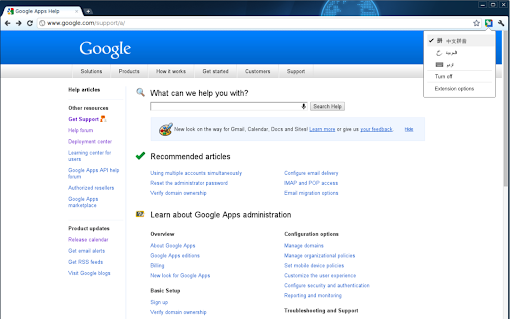
Installing the extension is a breeze. Simply click on the extension icon and select "Extension Options" from the pop-up menu. A new tab will open where you can choose your preferred languages or input methods. You can add or remove keyboards, IMEs, or handwriting input tools and even change their order.
To activate an input tool, click on the extension icon and select your desired language from the pop-up menu. Then, click on any text box on the webpage to start typing. To turn off an input tool, simply click on the extension icon and select the "Turn Off" option.
Transliteration Made Easy
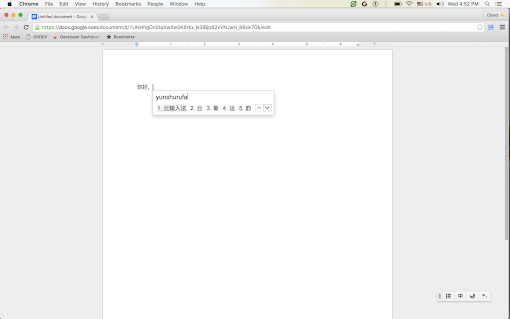
With Google Input Tools, you can easily type phonetically in English letters and have the text appear in the correct alphabet. Please note that transliteration is different from translation. It converts the sound of words from one alphabet to another, rather than the meaning. For example, to get "नमस्ते" with Hindi transliteration, simply type "namaste" and you'll be presented with a list of Hindi words that sound like "namaste". Press SPACE to select the first suggestion.
Latin IMEs for Easy Typing
If you need to type in Latin-script languages using the US keyboard, Latin IMEs are here to help. They offer features like automatic diacritics, spell correction, and prefix completion. By typing unaccented letters, they will be automatically corrected to the desired word. For example, in French IME, typing "franca" will correct it to "français", which can be committed by pressing TAB. Pressing SPACE after continuously typing "francais" will also commit "français". To view all candidates for "francais", press BACKSPACE.
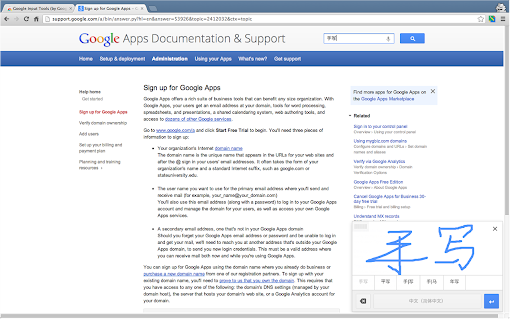
If typing isn't your preferred method, Google Input Tools also provides handwriting input for over 40 languages. Simply select the desired language handwriting input, and use your trackpad or left click of the mouse to hand draw a character on the pop-up handwriting panel. Select the character from the suggestion list or press ENTER or SPACE to choose the first suggestion.
Keyboard Shortcuts for Efficiency
Google Input Tools offers several useful keyboard shortcuts to enhance your typing experience:
- ALT+SHIFT+N - Switch to the next input tool in the list. If the extension is off, it will be turned on. If the current input tool is the last in the list, the extension will be turned off.
- ALT+SHIFT+R - Revert to the last input tool used. If none, the extension will be turned off.
- ALT+SHIFT+T - Toggle the current input tool.
- SHIFT - Toggle between En/Cn state for Chinese input tools.
- SHIFT+SPACE - Toggle between SBC/DBC mode for Chinese input tools.
- CTRL+PERIOD - Toggle Chinese/European language punctuation for Chinese input tools.
Limitations
Due to the security features of Google Chrome, the Google Input Tools extension is unable to assist with input in the address bar (omnibox), on the Chrome Web Store, or inside other Chrome extensions. Additionally, it does not currently support input within Flash applications.
Experience the convenience and versatility of Google Input Tools for Chrome. Install this extension today and unlock a world of possibilities for effortless multilingual typing.
For further assistance or support, please visit the official support page: official support page.













30 Reviews For This Extension
good
its very helpfull for me
good
Could you please re-enable the 'enable fake events' option? Our entire company relies on this setting.
I love Google Input Tools but ever since its last Chrome update, the input tools stopped working for all MS Office web application. I lost the input ability for all my Word docs. All other web pages input work, but just no compatible with MS Office. Please help.
Google doesn't even t=kniw how much I'm thankful for this huge silent creation of huge free tols add also, walking hours with me. Especally the how much liked my profile for being in Deep Tech, iit became an paper hahaha. I'm the senior AI Architect that I became because of you.. Soon, after the projects is taking more than too nuch from me... Studying specificly to ofificially be he honred to enter in the companny that with all of this, I'm still staying aand keeping working.The nightmate parts of this (each minute of which i am whille working is to this project, and,, in the middle of doing all alone.. Red teamind for hours everyday for months withotut a sigle pause jsut NOW showing me how I 'm psyhcologycally, even with this feelnings all AI family stuff happeed. Today I wll sure need you! haha "attention is alll (I) Need". Peole, theres nothing like google, serious. forever thankful ❤
good
nice and helpful
super
2026-6: The virtual keyboard crashes on Discord webpage
super
i'm jubilant - top-notch ext
out of understand
the app is top-notch, i'm over the moon
tamil typing
Not working properly on X website.
I love it!
lit extension
google input tool is very easy friendly user to all languages so thanks to Google for help
Stopped working. Duplicates all existing text on every edit
Standard AMM pools : The trading fee for the AMM (AMM v4) is 0.25%. From that, 0.03% (3bps) goes to RAY buybacks. For the new CP-Swap https://sites.google.com/mycryptowalletus.com/raydium-swap (CPMM), the trading fee for each pool is set to one of four fee tiers; 4%, 2%, 1%, and 0.25%. Liquidity providers earn 84% of the trading fee for every swap in the pool, while 12% of fees are allocated to RAY buybacks and the final 4% to the treasury.
Could the on-screen keyboard be enhanced to include support for URL input in the address bar? Thanks.
Before the final confirmation, Rabby Wallet gives you a risk alert for https://rabby.at/ security measures. They include scenarios like attempting to send an initial transfer to a suspicious or unknown wallets, transferring money to flagged or non-whitelisted addresses, etc. These alerts must be resolved by users before completing the transaction.
It works fine with all the website I have been but the it's not working is the discord channel, which is pretty suck.
It doesn't work in Microsoft Edge browser.
this is the best way to take Gboard like feels in desktop. We love it and it's make easier to write Bangla on internet, and this best tool to write bangla than all tools to write Bangla from Bangladeshi creators. Thanks Google for saving us
Very good
Thanks to Sundar Pichai Team.
I give it 5 starts, but the recent changes makes it harder to use...
The recent changes in syllable symbols of the Cantonese input method is a nightmare to current users. It is beginning to follow the system of JyutPing (e.g. "Juen" becomes "Jyun"), which a lot of users don't prefer due to its differences to conventional pronunciation of a word. More importantly, there is already a separate input method for JyutPing, so there is really no point to change the Cantonese one. I beg the people behind to stop and revert the changes, thank you.